



No-preview layout option mod for IceWarp Webmail Pro
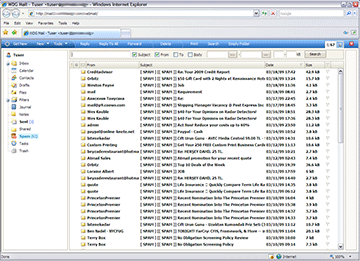
This mod(ification) adds a third option to the mail view layouts in IceWarp Webmail ("Pro" version). The new layout has no "preview" window, so it's just the folders on the left and the list of messages on the right. The two original layout options are still available as well. Simply keep clicking the layout change button (the one next to the logout red X) to cycle through the layouts.
Package comes with install/un-install scripts.
Current Version: 090407
For IceWarp Version: 9.4.1 ONLY
Download
Install
Note: The installation script assumes you have a default configuration where the \html folder is inside your IceWarp install root folder, and that you have the default skin installed in \html\webmail\client\skins\default\. It will make backups of all files it replaces, naming them like "filename.ext.bak." The process can be easily reversed by using the un-install script.
To install, extract the zip archive into your IceWarp installation root folder (same folder as tool.exe, smtp.exe, etc...). Execute (dbl-click or run from command line) the layout-mod_install.bat file. This will make backups and copy all the necessary files. You will be left with 2 .bat files in your IceWarp folder.
If you are already logged into Webmail, log out and then log in again. You will also, most likely, need to clear your browser's cache to have the changes take effect. Restarting your browser might also help. There is no need to restart the IceWarp services.
Uninstall
To un-install, execute layout-mod_UNinstall.bat in the IceWarp install root folder. This will restore all files that were backed up during install and remove all the new files installed by the mod.
Known issues
Only tested on Windows XP with IE 6 & 7 and Firefox 2 & 3. Please let me know if you find it to work, or not, on other configurations.
When using the new layout w/out preview window, if you right-click on a message and select "Open," nothing happens since the preview pane is not visible. You have to select "Open in Window" instead. Double-clicking on a message does open it in a new window, so this is a minor annoyance.
Technical
Almost all the CSS and JS code that Webmail uses is compressed into single style.css and javascript.js files, respectively. The individual source files are also included in the IceWarp distribution, which makes modifications much easier. They also provide a tool to regenerate the compressed files from the current sources (in \html\webmail\client\tools\). This mod package includes the compiled style.css and javascript.js files as well as the source .css and .js files which were modified/added. This should make it easier to identify the changes and re-apply them in the future.
I do have a version that works with IceWarp 10 (20090320) if anyone is interested. It's only slightly different from the 9.4 version due to the new obj_dginfo_main container.
Credits / Contact
IceWarp layout-mod is written and maintained by Maxim Paperno of World Design Group, Inc., a Web development and hosting firm in Ithaca, NY, USA. You can contact me at MPaperno@WorldDesign.com.
Disclaimer
This modification is distributed in the hope that it will be useful, but WITHOUT ANY WARRANTY; without even the implied warranty of MERCHANTABILITY or FITNESS FOR A PARTICULAR PURPOSE. USE AT YOUR OWN RISK AND ALWAYS TEST FIRST BEFORE RELYING ON ANYTHING!
